The Hunt for Local Frontier AI

Frontier-class agentic coding, running fully local. Capability close to the cloud frontier, owned outright at a fixed hardware cost and $0 per token. The goal was never any single model; as new open weights land, the best one gets swapped in. Here's the build, what runs on it, and what broke.

The Goal

What I was after was agentic coding rather than a chat window. A model that holds a plan across a dozen tool calls, edits real files, and doesn't lose the thread halfway through a refactor. That was the goal the day the rig came online, and for the first few months it was closer to a demo than something I'd trust with real work. The Qwen3-Coder release in mid-2025 is when it stopped being a toy.

The money side is simpler than it looks. The hardware is a fixed cost that's already spent, and every token after that is free. What that buys isn't really savings, it's the freedom to stop counting. A metered API makes you think twice before pointing an agent at a big refactor, and that hesitation is expensive in a way no invoice shows you.

Then there's control. That one you don't get back once you've given it up. Code and data never leave the network. Nothing is logged by a third party, nothing trains on my prompts, and there's no rate limit to negotiate with at eleven at night. For anything touching work, that alone justifies the rest.

The Build

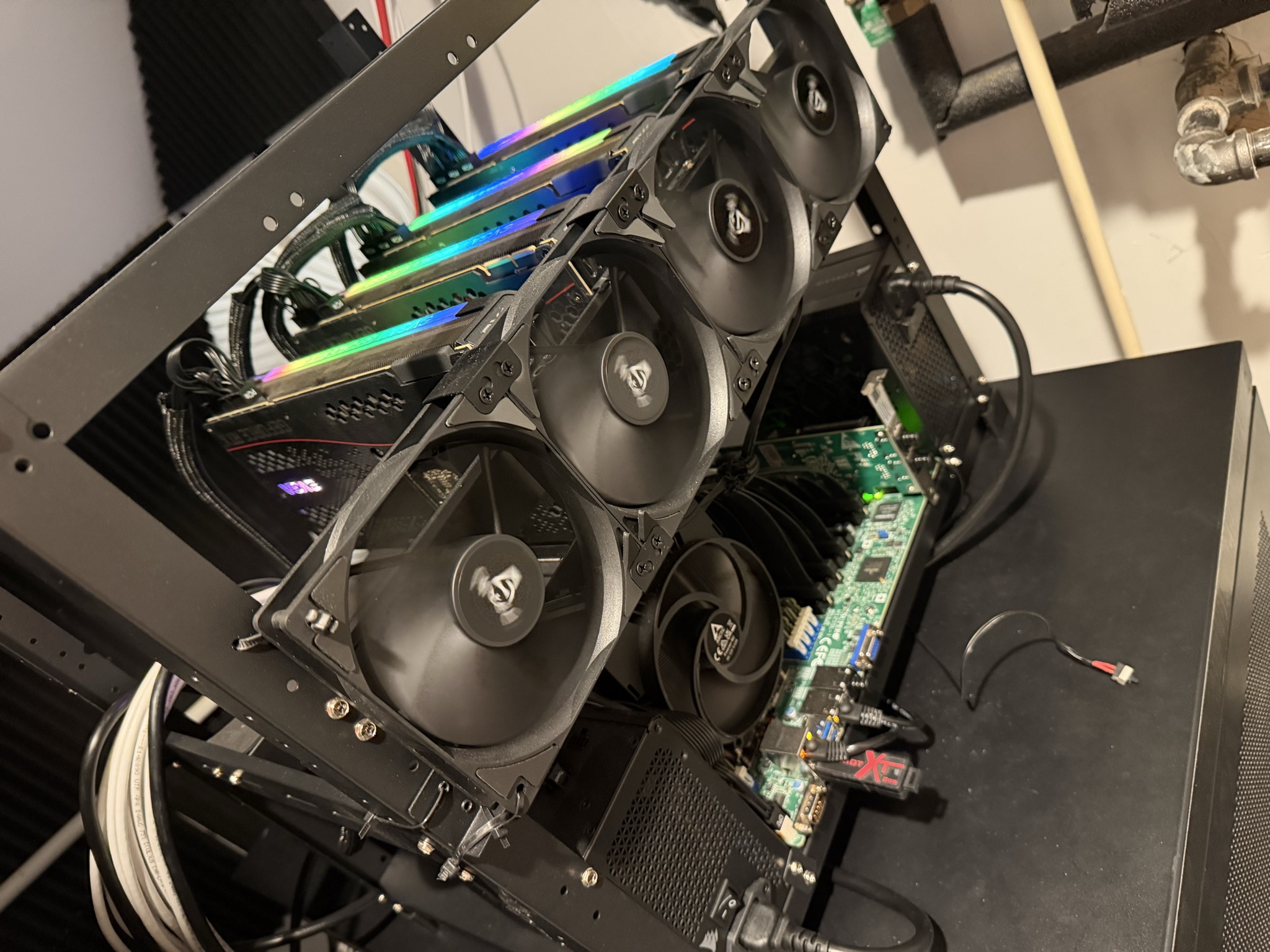
Four RTX 3090s give 96 GB of VRAM on a 32-core EPYC server platform, a fraction of the cost of a single data-center card, and enough to run and fine-tune serious models locally. Power-limited to 280 W per card: far cooler, with negligible throughput loss.

GPUs4 x EVGA RTX 3090 FTW3 Ultra24 GB each · 96 GB total · 2 x $850 + $1,100 + $1,050$3,850
MemoryOWC 512 GB DDR4-32008 x 64 GB · ECC RDIMM · 8-channel$1,900
MotherboardSupermicro H12SSL-ISP3 · ATX · 7 x PCIe 4.0 x16$650
PowerCorsair 1200 W + 1000 W$180 + $150 + $60 dual-PSU add-on$390
Storage2 x WD Black NVMe SSD$130 each · models & datasets$260
CPUAMD EPYC 753232C / 64T · Zen 2 · 256 MB L3 · 200 W · SP3$250
Risers4 x PCIe 5.0 riser cables$55 each · to space the cards on the frame$220
Cooling4 x ARCTIC P12120 mm · $50 each$200
NetworkDual-port 10 GbE Intel NIC2 x SFP+/RJ45 · to the apps VM & storage$110
FrameOpen-air GPU framefour triple-slot cards won't fit a case$60
CPU coolerArctic Freezer (SP3 bridge)SP3 mount$50
Total buildFull build. Every line is a real or current-retail price
$7,940

The receipt above is what I paid in January 2025, and it is no longer reproducible. The same machine built today comes to roughly 38% more, and almost none of that is the graphics cards.

Used 3090s are up about a quarter, to around $1,200 a card. That is what you would expect of the cheapest way to own 24 GB of VRAM once everybody worked out that it was. The line that actually moved is the memory: the same 512 GB ECC kit that cost me $1,900 has more than doubled to $4,000, and it alone is over a third of the build. The reason usually given is that datacenter demand has taken the DRAM supply with it, which sounds right and is not something I can verify from here.

Worth sitting with, if you are doing this arithmetic yourself: the volatile part was not the exotic one. It was the boring commodity everybody budgets last.

GPUs$3,850 -> $4,8004 x used RTX 3090 · $962 a card -> $1,200+$950
Memory$1,900 -> $4,000the same OWC 512 GB DDR4-3200 ECC kit · +111%+$2,100
Same build, August 2026Same build, today. Only the two lines that moved are re-priced
$10,990
The four-GPU rig on its open-air frame

Power & Wiring

Four 3090s at full tilt pull about 1.7 kW before the rest of the machine draws anything. A standard 15 A household circuit tops out near 1.8 kW, and you don't run one at its limit for hours at a time, so the honest answer is that this rig doesn't plug into a wall outlet. That caught me off guard more than any other part of the build. I had budgeted carefully for GPUs and never once thought about the breaker panel.

So I ran two dedicated 20 A circuits. The rig sits on its own breakers now, with headroom instead of that low-grade worry about whether a long training run is going to trip something at three in the morning. If you're planning a build anywhere near this size, price the electrical work in at the start rather than discovering it halfway through.

Power delivery inside the frame splits the same way. A Corsair 1200 W carries the CPU, motherboard, and two GPUs; a 1000 W carries the other two cards, and a dual-PSU add-on board switches both supplies on together from the single power button. Splitting the load across two circuits and two supplies also left room on every rail, and that headroom is the only reason a 5th and 6th card is a realistic upgrade rather than a rewiring project.

Cooling

The circuits were the surprise I already mentioned. Cooling was the bigger one. Four cards pushing ~1.7 kW into a closed room stops being a computer problem fairly quickly, and on a long run that room reached 105 °F. At that point you're not managing a rig, you're managing a room.

The fix was a Dreo 318S portable air conditioner, run with the dual-hose adapter rather than as a single-hose unit. That part matters more than it sounds. On a single hose the unit dumps room air out the window and pulls unconditioned air back in through every gap it can find, so in a room that is actively generating heat it spends the day fighting itself. The second hose gives it outside air for the condenser instead. That's the difference between keeping up and slowly losing.

It's Home Assistant compatible, so it doesn't just sit there running all day. A thermostat feeds a Home Assistant integration that switches the AC on to hold the room between 72 and 75 °F, and where in that band it aims depends on what the rig is actually doing. GPU load comes from Prometheus, the same metrics already feeding the Grafana dashboards, so a heavy training run pulls the setpoint down before the room has a chance to climb rather than after.

If I were planning this again, cooling would be on the first spreadsheet. It was a larger afterthought than the electrical work, and the electrical work was already the part I hadn't thought about.

The Stack

The box runs as a virtualized inference platform. Proxmox owns the metal, all four 3090s are passed through to a dedicated inference VM, and the clients and monitoring live on separate VMs that reach it over the network.

This is the second Proxmox host here, not the only one. The file server runs TrueNAS on its own machine, and keeping them apart was deliberate: ZFS wants to use every spare byte of memory as cache, and so does an inference workload, so putting both on one box means one of them loses. That machine also predates this one by most of a year, which meant the storage was already solved before the GPUs arrived.

The split exists because the cards stay put while everything around them changes. A training run and a serving workload want different drivers, different power limits, and different amounts of system RAM, and re-provisioning a VM is a far smaller operation than rebuilding a host. The machine can be a training rig in the morning and an inference server by the afternoon without touching hardware.

The host is Proxmox VE 9.2 on an EPYC 7532 and a Supermicro H12SSL-I, with IOMMU and VFIO passthrough of all four 3090s at PCIe 4.0 x16 and clean IOMMU groups. The inference VM is Ubuntu 24.04 running vLLM, with 24 vCPU, 88 GiB of RAM and all four cards, serving an OpenAI-compatible API under systemd. Everything I actually touch lives on a third, CPU-only VM: Open WebUI, opencode and Hermes, alongside Prometheus, Grafana and DCGM for live GPU and token metrics.

That inference VM gets rebuilt into one of three shapes depending on the job. For fine-tuning it gets the full CUDA toolkit, all four GPUs, and the 280 W cap lifted back to full board power at ~350-420 W, since training is compute-bound and those watts buy real throughput; DeepSpeed and Accelerate shard the LoRA and QLoRA runs, with more system RAM set aside for datasets. For reasoning and serving it runs driver-only at the 280 W cap, pipeline-parallel for the big MoE, exposing the API. That second shape is the one documented below.

The third is a lighter CPU-side profile for agentic testing, driving OpenClaw and Hermes against whatever is already being served. It runs harnesses and evals without holding GPU memory itself, which means I can hammer on agent behavior without disturbing the model that's up.

Setup Guide

Updated June 2026

The full build, host to Grafana. Every command, config file, and systemd unit, straight from my own notes. Tap any step to expand it.

01

This build assumes the host already has AMD IOMMU enabled and the four 3090s bound to vfio-pci. Confirm that before creating the VM. If a GPU is still bound to nvidia/nouveau on the host, passthrough won't work. First, that IOMMU is active and groups populate:

dmesg | grep -i -e DMAR -e IOMMU | head
ls /sys/kernel/iommu_groups | wc -l      # > 0 -> IOMMU is on

Find the four GPUs (NVIDIA vendor id 10de) and confirm each is bound to vfio-pci:

lspci -nnk -d 10de:
# expect c1:00, c2:00, 01:00, 81:00
# each -> "Kernel driver in use: vfio-pci"  (not nvidia/nouveau)

Confirm the IOMMU groups are clean, each GPU isolated:

for d in /sys/kernel/iommu_groups/*/devices/*; do
  g=${d#*/iommu_groups/}; g=${g%%/*}
  printf 'group %s: ' "$g"; lspci -nns "${d##*/}"
done | grep -i nvidia

Each 3090 should sit alone in its group (at most its own audio function and root-port bridge), so no ACS-override hack is needed. Link-width check on a card: lspci -vvs c1:00.0 | grep -i lnksta -> Speed 16GT/s, Width x16 (PCIe 4.0 x16).

02

VM 100 (ubuntu-vllm). Confirmed-good settings:

Machine     q35
BIOS        OVMF (UEFI)  + add EFI disk
SCSI        VirtIO SCSI single
Disk        scsi0 · 1000 GB on NVMe · discard + iothread
CPU         host · 24 cores
Memory      90112 MiB (88 GiB) · ballooning OFF
Network     vmbr0 · VirtIO

Attach the four GPUs with All Functions + PCI-Express, and Primary GPU unchecked on all of them (that box sets x-vga=1, which fights the headless console). Add the c1/c2 pair first so the priority pair lands on CUDA 0,1:

qm set 100 -hostpci0 0000:c1:00,pcie=1   # -> CUDA 0  (priority pair)
qm set 100 -hostpci1 0000:c2:00,pcie=1   # -> CUDA 1
qm set 100 -hostpci2 0000:01:00,pcie=1   # -> CUDA 2
qm set 100 -hostpci3 0000:81:00,pcie=1   # -> CUDA 3

Sanity-check the config: qm config 100 -> expect machine: q35, bios: ovmf, balloon: 0, the four hostpci lines, and no x-vga.

Secure Boot: OVMF ships with pre-enrolled keys, so the proprietary driver won't load without MOK enrollment. The easiest headless path is to disable Secure Boot at first boot (Esc at the TianoCore splash -> Device Manager -> Secure Boot Configuration -> disable), or complete MOK enrollment during the driver install.

03

Minimal Ubuntu Server 24.04 install with Install OpenSSH server checked and a static IP / DHCP reservation. On the storage summary set ubuntu-lv to max. Guided "use entire disk + LVM" only allocates ~100 GB and strands the rest. Choose "Do not install third-party drivers now." If you skipped the LV resize, fix it after boot:

sudo lvextend -l +100%FREE /dev/ubuntu-vg/ubuntu-lv
sudo resize2fs /dev/ubuntu-vg/ubuntu-lv
df -h /

Update, then install the driver (595-server, driver only, no CUDA toolkit):

sudo apt update && sudo apt upgrade -y
sudo apt install -y build-essential python3-venv python3-pip tmux
sudo ubuntu-drivers install
sudo reboot

Confirm cards + topology, and lock device order (also set in the service later, since /etc/environment only covers interactive shells):

nvidia-smi                    # 4x RTX 3090, 24576 MiB each
nvidia-smi topo -m            # all PHB, NUMA node 0
nvidia-smi topo -p2p r        # all NS (no P2P), expected on Zen 2
echo 'CUDA_DEVICE_ORDER=PCI_BUS_ID' | sudo tee -a /etc/environment

If Secure Boot is still enabled, you set a MOK password here and must choose Enroll MOK on the blue screen at the next reboot. Otherwise nvidia-smi comes up empty.

04

Four cards at 420 W is ~1.7 kW; 280 W barely affects inference throughput while running far cooler. Create /etc/systemd/system/nvidia-powerlimit.service:

[Unit]
Description=NVIDIA persistence mode and power limit

[Service]
Type=oneshot
RemainAfterExit=yes
ExecStart=/usr/bin/nvidia-smi -pm 1
ExecStart=/usr/bin/nvidia-smi -pl 280

[Install]
WantedBy=multi-user.target

Enable and verify:

sudo systemctl daemon-reload
sudo systemctl enable --now nvidia-powerlimit.service
nvidia-smi --query-gpu=index,power.limit,persistence_mode --format=csv

This 280 W cap is for inference, which is memory-bandwidth bound, so the throughput hit is barely measurable. Training is different: it's compute-bound, so for fine-tuning runs the limit comes off (nvidia-smi -pl 350 and up) and the extra watts translate into real training throughput.

05

vLLM in a venv (needs >=0.19.0 for the Qwen3.6 models):

sudo mkdir -p /opt/vllm && sudo chown $USER /opt/vllm
python3 -m venv /opt/vllm/venv && source /opt/vllm/venv/bin/activate
pip install --upgrade pip && pip install vllm
vllm --version

Pull AWQ quants (vLLM can't load GGUF) from the cyankiwi quant team. Authenticate with a free HF Read token, then download inside tmux with the Xet backend disabled:

pip install -U huggingface_hub
export HF_TOKEN=hf_your_read_token
sudo mkdir -p /opt/models && sudo chown $USER /opt/models

tmux new -s dl
export HF_HUB_DISABLE_XET=1      # hf-xet wedged the VM; force classic HTTPS
hf download cyankiwi/Qwen3-Coder-Next-AWQ-4bit  --local-dir /opt/models/Qwen3-Coder-Next-AWQ-4bit
hf download cyankiwi/Qwen3.6-27B-AWQ-BF16-INT4  --local-dir /opt/models/Qwen3.6-27B-AWQ-BF16-INT4
# optional: bundled coder:
hf download cyankiwi/Qwen3.6-35B-A3B-AWQ-4bit   --local-dir /opt/models/Qwen3.6-35B-A3B-AWQ-4bit

Detach tmux with Ctrl+B then D; downloads resume on re-run. The core set is Coder-Next 80B (~45 GB, best coder) and Qwen3.6-27B (~28 GB, planner); the 35B-A3B (~20 GB) is only for the both-live bundle. If hf-xet hangs anyway (unkillable D-state), reboot the VM from Proxmox; partial files are preserved.

06

Default daily driver: Coder-Next, all four GPUs, pipeline-parallel (required, P2P is NS). VLLM_USE_FLASHINFER_SAMPLER=0 is mandatory on a driver-only box, or FlashInfer JIT-compiles a sampler kernel at startup and crashes with "Could not find nvcc":

NCCL_P2P_DISABLE=1 CUDA_DEVICE_ORDER=PCI_BUS_ID VLLM_USE_FLASHINFER_SAMPLER=0 \
/opt/vllm/venv/bin/vllm serve /opt/models/Qwen3-Coder-Next-AWQ-4bit \
  --pipeline-parallel-size 4 --gpu-memory-utilization 0.92 --max-model-len 262144 \
  --enable-auto-tool-choice --tool-call-parser qwen3_coder --host 0.0.0.0 --port 8000

First start takes a few minutes (weight load + torch.compile + CUDA-graph capture, then cached). Watch for Application startup complete, then confirm in another shell:

curl http://localhost:8000/v1/models

Benign startup warnings to ignore: Triton kernel JIT on the first request, unbatched P2P op / new 2-rank NCCL communicator (expected with NCCL_P2P_DISABLE=1), and a cosmetic torch.frombuffer "buffer is not writable" UserWarning. A healthy log shows ~90-100 tokens/s at Running: 1 reqs. If it OOMs on the KV cache, dial --max-model-len back toward 200000.

07

Three unit files, one per model, each on its own permanent port so a saved client chat always maps to one known model:

Unit                          Model                GPUs        Port  Served name
vllm-qwen-coder-next.service  Qwen3-Coder-Next 80B  all 4 (PP4)  8000  qwen-coder-next
vllm-qwen-planner.service     Qwen3.6-27B           0,1 (TP2)    8001  qwen-planner
vllm-qwen-bundle.service      Qwen3.6-35B-A3B       2,3 (TP2)    8002  qwen-bundle

The coder-next unit, /etc/systemd/system/vllm-qwen-coder-next.service:

[Unit]
Description=vLLM coder-next: Qwen3-Coder-Next 80B (all 4 GPUs)
After=network-online.target nvidia-powerlimit.service
Wants=network-online.target nvidia-powerlimit.service

[Service]
User=anandpatel
Environment=CUDA_DEVICE_ORDER=PCI_BUS_ID
Environment=NCCL_P2P_DISABLE=1
Environment=VLLM_USE_FLASHINFER_SAMPLER=0
ExecStart=/opt/vllm/venv/bin/vllm serve /opt/models/Qwen3-Coder-Next-AWQ-4bit --pipeline-parallel-size 4 --gpu-memory-utilization 0.92 --max-model-len 262144 --enable-auto-tool-choice --tool-call-parser qwen3_coder --served-model-name qwen-coder-next --host 0.0.0.0 --port 8000
Restart=on-failure
RestartSec=10

[Install]
WantedBy=multi-user.target

The planner and bundle units are the same shape, each pinned to a GPU pair. They add CUDA_VISIBLE_DEVICES=0,1 (or 2,3), --tensor-parallel-size 2, --reasoning-parser qwen3, and --gpu-memory-utilization 0.85 --enforce-eager --max-num-seqs 4. Those last three are what let the hybrid Qwen3.6 models fit and run cleanly on a 24 GB card at TP2:

# vllm-qwen-planner.service  (27B · GPUs 0,1 · port 8001)
Environment=CUDA_VISIBLE_DEVICES=0,1
ExecStart=... /opt/models/Qwen3.6-27B-AWQ-BF16-INT4 --tensor-parallel-size 2 \
  --gpu-memory-utilization 0.85 --enforce-eager --max-num-seqs 4 \
  --reasoning-parser qwen3 --enable-auto-tool-choice --tool-call-parser qwen3_coder \
  --served-model-name qwen-planner --port 8001

Enable and watch; switch layouts by disabling the side that shares the GPUs first:

sudo systemctl daemon-reload
sudo systemctl enable --now vllm-qwen-coder-next
journalctl -u vllm-qwen-coder-next -f

# handoff: plan on the 27B, swap, implement on the 80B
sudo systemctl stop  vllm-qwen-planner
sudo systemctl start vllm-qwen-coder-next   # ~1-2 min to load

Replace User= with your login (whoami). A literal <user> makes systemd fail 217/USER and crash-loop every 10 s. Three ways to work: best coder (80B solo), best planner (27B solo), best plan + code via a handoff (the plan is a .md that survives the model swap), or the both-live bundle (27B + 35B, instant Plan/Act toggle, weaker coder).
08

Every client lives on a separate CPU-only apps VM and reaches vLLM at :8000 / :8001 / :8002 as a plain OpenAI-compatible backend (the API key is ignored unless you launch with --api-key). Open WebUI: Admin -> Settings -> Connections, one OpenAI connection per port (:8000->qwen-coder-next, :8001->qwen-planner, :8002->qwen-bundle), key any non-empty string.

opencode: ~/.config/opencode/opencode.json, a custom provider per endpoint so Plan/Act can plan on the 27B and act on the coder:

{
  "provider": {
    "vllm": {
      "npm": "@ai-sdk/openai-compatible",
      "options": { "baseURL": "http://<vllm-ip>:8000/v1", "apiKey": "sk-local" },
      "models": { "qwen-coder-next": { "name": "Qwen3-Coder-Next" } }
    }
  },
  "model": "vllm/qwen-coder-next"
}

Hermes: point the default profile at the 80B coder (hermes model -> Custom endpoint -> :8000) and add a planner profile on the 27B (hermes -p planner model -> :8001). The big local-only gotcha: auxiliary side-jobs default to a cloud chain and silently fail with no key, so pin them to the local model in ~/.hermes/config.yaml:

auxiliary:
  compression: { provider: main }
  web_extract:  { provider: main }
  vision:       { provider: main }

Each vLLM port serves exactly one model, so a saved chat always maps to the same one. curl -s http://<vllm-ip>:8000/v1/models shows the served name to reference in every client.

09

vLLM exposes Prometheus metrics at /metrics on each API port. Scrape all three, plus the GPU and host exporters (a port reads DOWN when its model isn't running, which is expected; the per-model split comes from the model_name label, not the port):

# prometheus.yaml
global: { scrape_interval: 5s }
scrape_configs:
  - job_name: vllm
    static_configs:
      - targets: ['<vllm-ip>:8000','<vllm-ip>:8001','<vllm-ip>:8002']
  - job_name: dcgm
    static_configs: [{ targets: ['<vllm-ip>:9400'] }]
  - job_name: node
    static_configs: [{ targets: ['<vllm-ip>:9100'] }]

On the vLLM VM, add the GPU + host exporters (the DCGM snap bundles everything, node_exporter comes from apt):

sudo snap install dcgm && sudo snap start dcgm.dcgm-exporter   # GPU telemetry :9400
sudo apt install -y prometheus-node-exporter                    # host metrics  :9100
sudo ufw allow 9400/tcp; sudo ufw allow 9100/tcp

tokens/sec, split per model by label (not by port):

sum by (model_name) (rate(vllm:generation_tokens_total[1m]))

Import three Grafana dashboards for the full picture: the official vLLM board (app-level tokens/queue/KV), DCGM ID 12239 (per-GPU temp/power/VRAM/clocks), and Node Exporter Full ID 1860 (host CPU/RAM/disk). On consumer 3090s the DCGM profiling fields may stay empty, and the core panels don't need them.

Model Timeline

Updated August 2026

Open models moved fast through 2025-26, and this is the running log of what I deployed as new releases landed. The earlier 2025 entries are reconstructed from memory. Each card shows expected vs measured single-stream decode throughput (tok/s) on the 4 x 3090 config. Real numbers ran a little under theoretical, as they always do once P2P-disabled pipeline parallelism and quant overhead are in the loop, and they line up with published 4 x 3090 vLLM benchmarks (a dense 32B lands near 35-40 tok/s single-stream; a 3B-active MoE clears 90+).

Jan 2025
Qwen2.5-Coder-32Bwhere it started
32B dense · first local coder

The rig comes online with the strongest local coder of the moment. Day-one goal: prove a 4 x 3090 box could replace cloud coding entirely, with no inference bill and full data control.

expected42 tok/s actual~36 tok/s
Jan 2025
DeepSeek-R1 (distilled)
reasoning wave · 32B / 70B distills

R1 dropped and reasoning went mainstream. Ran the Qwen/Llama distills locally to get visible chain-of-thought, the first time the rig felt like it was thinking rather than autocompleting.

expected40 tok/s actual~33 tok/s
Feb 2025
Mistral Small 3 (24B)
24B dense · Apache 2.0

Mistral's dense 24B. Fast, low-latency, and a strong generalist. Tested as a lighter daily driver when the 32B coders were overkill; the latency win was real, but it gave up ground on hard agentic tasks.

expected48 tok/s actual~41 tok/s
Mar 2025
QwQ-32B
32B dense reasoner

Qwen's dedicated reasoning model, with long, deliberate chains of thought at 32B. It punched above its size on math and planning and became a candidate planner before the Qwen3.6 reasoners arrived.

expected44 tok/s actual~39 tok/s
Mar 2025
Gemma 3 (27B)
27B dense · multimodal · Google

Google's open 27B with vision and a large context window. Ran it to try multimodal prompts locally. Capable and well-behaved, though the Qwen coders stayed ahead for pure agentic software work.

expected44 tok/s actual~38 tok/s
Apr 2025
Qwen3
hybrid thinking MoE · Apache 2.0

Hybrid thinking / non-thinking modes made it the daily workhorse, with reasoning on for hard problems and off for speed. The MoE variants were a preview of where the whole stack would head.

expected56 tok/s actual~48 tok/s
Apr 2025
Llama 4 ScoutMoE experiment
109B total · 17B active · long context

Meta's first big open MoE. 17 B active means heavier per-token compute than the 3 B-active Qwens, so it ran, but slower for its quality. Interesting for its context length; not a keeper against the sparser coders.

expected52 tok/s actual~43 tok/s
May 2025
Devstral Small
agentic coding · SWE-tuned

First model built specifically for agentic software engineering. Tool use in the agent loop got noticeably more reliable, the point where "local coding agent" stopped being a toy.

expected50 tok/s actual~43 tok/s
Jul 2025
Qwen3-Coder
agentic coder · 256K context

Agentic coding with a 256K window. The local setup finally felt production-grade for real repo work, since long context meant whole codebases in a single session.

expected88 tok/s actual~75 tok/s
Aug 2025
GLM-4.5-Airagentic
106B total · 12B active · agentic MoE

Zhipu's agentic MoE, the smaller Air variant. Strong at tool use and multi-step coding, one of the few non-Qwen models that seriously competed for the daily-driver slot.

expected60 tok/s actual~51 tok/s
Aug 2025 · experiment
gpt-oss-120b
~120B MoE · MXFP4 · handoff-only

OpenAI's open MoE, trialed as a heavyweight solo planner in high-reasoning mode. Its MXFP4 quant is tuned for Hopper, so on Ampere it falls back to the Marlin path. Capable, but at ~63 GB it needs every card, so handoff-only, never co-resident with a coder.

expected44 tok/s actual~30 tok/s
Feb 2026
Qwen3.6-27B
dense reasoner · ~28 GB (4-bit) · 2-GPU pair

Adopted as the dedicated planner, a dense model with an explicit thinking phase, stronger at deliberate, step-by-step plans. Fits a single GPU pair, which leaves room for a coder right beside it.

expected38 tok/s actual~33 tok/s
Mar 2026
Qwen3.6-35B-A3B
35B total · 3B active · ~256K ctx · ~20 GB

A sparse MoE coder small enough to share a pair, so the planner and the coder run live at the same time. Instant Plan -> Act toggle with no model reload between them.

expected96 tok/s actual~82 tok/s
May 2026
Qwen3-Next-80B-A3B80B-class milestone
80B total · 3B active · 512 experts · 262K ctx (-> ~1M)

A high-sparsity mixture-of-experts. Only ~3 B of the 80 B parameters fire per token, so it streams fast despite its size (Qwen cites ~10x the throughput of a 32B dense model past 32K context). Running it solo across all four GPUs at full 262K context pushed local coding the closest yet to frontier-class.

expected108 tok/s actual~92 tok/s
Aug 2026 · new
Qwen3.8-27Bin testing
27B · newest drop · under evaluation

Just landed and currently on the bench. I'm pulling the AWQ quant, wiring the tool-call and reasoning parsers, and running it against the current daily driver on SWE-rebench. Early impressions are promising; will report back with numbers soon.

expected40 tok/s actualmeasuring...
Now · ongoing
Whatever's best, the day it lands
pull · quantize · re-benchmark · swap

Every new open-weight release gets pulled, quantized to AWQ, and benchmarked against the current daily driver, and the best one wins the slot. The rig stays fixed; the models keep getting better, and the gap to frontier keeps closing.

How I Use It

I started on Claude, which sounds backwards for a page about running everything locally. The point was calibration. I wanted to know what good agentic coding actually felt like against a frontier model before spending months trying to reproduce it on my own hardware, because otherwise you end up grading local models against a standard you've only imagined.

Going local meant pointing a real agent at my own vLLM endpoint, and I tried both opencode and OpenClaw against it. Both worked. Actual coding agents, running entirely on the four 3090s, with nothing leaving the network.

I landed on Nous Research's Hermes, mostly for the native plan mode and the self-improving loop, both driving the local models. That's the setup I use day to day.

Beyond coding: Home Assistant

The same local models drive a fully private Home Assistant voice setup, so home control and automation happen in plain language with nothing leaving the network. No cloud, no subscription, and no one else's servers sitting in the middle of my house.

Lessons Learned

The build taught me as much about what this hardware can't do as what it can. Most of these only became obvious after the money was spent, as these things go. The honest tradeoffs, especially around training on consumer GPUs:

The 3090 is really an inference card.

24 GB of GDDR6X per card and no fast card-to-card link means the rig is good at serving and light fine-tuning, and poor at large-scale training. I went in assuming four cards would add up to something like one big card, and they don't. What you get is four capable machines that happen to share a chassis. If I were buying again I'd still buy them, but I'd buy them to run models and treat training as a bonus rather than a plan.

No NVLink -> PCIe becomes the training bottleneck.

Data-parallel training all-reduces gradients every step. With no NVLink and P2P Not-Supported under Zen 2 passthrough, that traffic crawls over PCIe 4.0 through host memory, so multi-GPU training scales poorly. Inference barely cares, since pipeline-parallel only passes small activations between stages, which is exactly why the same box is great at serving and mediocre at training.

VRAM is per-card, not pooled.

96 GB total is four separate 24 GB islands, and the spec sheet number is the most misleading figure in the whole build. A tensor has to fit its shard in 24 GB or pay the interconnect tax to span cards. Full fine-tunes of big models simply don't fit. LoRA and QLoRA do, which leaves parameter-efficient training at small batch sizes as the realistic ceiling here.

Consumer cards skip the datacenter features.

No ECC on the 3090's memory, no MIG partitioning, and DCGM's profiling fields come back empty. The missing ECC is the one that matters. Over a multi-day run a single bit-flip can quietly corrupt a training job, and you won't get an error, you'll get a model that's subtly wrong. For inference, where a bad token is just a bad token, none of this matters. For long training runs it's a gamble.

Power and heat cap training before the GPUs do.

The watts that speed training up are the same watts that turn into heat. Four cards at full ~350-420 W is ~1.7 kW going into an open-air frame in a room that has to absorb it. Inference sits happily at a 280 W cap and the throughput loss is barely measurable, which is why that's the default here. Sustained full-power training needs the cooling, the dual-PSU headroom, and an electricity budget to match.

The economics only close for inference.

At ~$7.9K the rig pays for itself against metered cloud inference in months, though that math only covers serving. For a serious training run you'd still rent H100s by the hour and be better off for it. What the money actually buys is unlimited private inference, which is a good deal if that's the problem you have. It's a poor deal if you thought you were buying a training cluster, and that's worth being clear-eyed about before the parts arrive.

Gotchas & Fixes

The build was a string of Proxmox and passthrough heartaches, each ended by one obscure setting. The war stories:

Only some GPUs enumerated

Four cards under passthrough need Above 4G Decoding + Resizable BAR on, and CSM off, in the host BIOS. Without it they won't all show up.

The VM console went black

Leave "Primary GPU" unchecked on every passthrough card. That box sets x-vga=1 (display passthrough), which fights the virtual console on a headless node.

nvidia-smi came up empty

Secure Boot was silently blocking the unsigned driver. Either complete MOK enrollment at the next reboot, or disable Secure Boot in the OVMF menu.

GPUs wouldn't initialize

Passthrough memory must be statically backed, so turn VM ballooning off. With it on, the cards fail to come up.

A download hung, unkillable

The hf-xet backend wedged the VM into an unkillable D-state, and a hard reboot was the only exit. Fix: HF_HUB_DISABLE_XET=1 forces the classic resumable HTTPS downloader.

vLLM crashed: "Could not find nvcc"

Driver-only box (no CUDA toolkit), and FlashInfer tried to JIT-compile a sampler kernel at startup. VLLM_USE_FLASHINFER_SAMPLER=0 falls back to the native PyTorch sampler.

Multi-GPU comms hung

P2P is Not Supported across Zen 2 passthrough. Set NCCL_P2P_DISABLE=1 and run pipeline-parallel instead of assuming NVLink-style peer access.

Service crash-looped every 10s

A literal <user> placeholder left in the systemd unit -> status=217/USER. It never even reached vLLM. Put your own login name there.